Domain-Adaptive Pre-Training: Tailoring LLMs for Specialized Applications
This post is a review of what I learned in NVIDIA's DAPT workshop, along with some notes and code. My university gave me access to NVIDIA's hands-on workshop catalog for free. The workshop is closely aligned with NVIDIA's NeMo Curator ecosystem — the lab uses NeMo Curator to ingest, clean, deduplicate, and filter domain-specific data before applying DAPT.
These notes are mostly for myself to look back on, and they also document my journey into AI. If you decide to read this, I hope you enjoy!
Domain-Adaptive Pre-Training (DAPT) is the process of further training pre-trained general LLMs on domain-specific data. For example, we might train an LLM on curated cybersecurity data to make it better at answering cyber-specific questions.
Dependencies for the notebook:
apt update
pip install "numpy<2" --break-system-packages
pip install datasets sentencepiece jsonlines tokenizers transformers torch ftfy matplotlib
pip install protobuf==3.20.1
pip install "huggingface_hub==0.24.6" --break-system-packages
1. Data Curation
The tutorial follows these steps:
- Install requirements and import libraries
- Download data from online sources (GitHub repos, wiki URLs, arXiv PDFs), extract metadata, and convert to JSONL
- Load the dataset
- Examine file types and sizes (optional)
- Run the data curation pipeline with NeMo Curator
- File type identification and separation
- Document-level exact deduplication
- Heuristic-based quality filtering (line count, word count, top N-grams, etc.)
- Fix Unicode errors via
ftfy - PII redaction
- GPU-accelerated fuzzy and semantic deduplication
- Save the filtered and curated data
- Blend datasets and shuffle
I used NeMo Curator, NVIDIA's open-source library for scalable data curation, built on top of Dask for distributed computing.
Dask parallelizes the pipeline across multiple workers, so instead of processing one document at a time, you can process partitions of documents simultaneously.
Troubleshooting
When running the non-demo version of the DAPT Curation notebook, I encountered numerous issues, mostly due to outdated code. I fixed as many problems as possible so we could observe the full workflow. The demo skips blending/shuffling and does not perform PII redaction or deduplication.
Common issues:
NumPycompatibility: modules compiled with NumPy 1.x may fail on NumPy 2.2.6. Pin it:
pip install "numpy<2" --break-system-packages
- Rate limits from arXiv when downloading many files — add delays and reduce concurrency.
- Wikipedia returns 403 unless a
User-Agentheader is included:
url = 'https://en.wikipedia.org/wiki/PowerPC'
response = requests.get(url, headers={'User-Agent': 'Mozilla/5.0'})
The workshop used 8 Dask workers to fetch articles concurrently — this can overwhelm your machine while loading spaCy models. I reduced workers to two for stability.
Show compatibility patch script
cat > /tmp/fix_all.py << 'ENDOFSCRIPT'
# DAPT Workshop - Comprehensive Fix Script
# Fixes compatibility issues in dapt-curation/docbuilder.py
# and NeMo-Curator's doc_builder.py

import sys

TARGET = '/dli/task/01_data_curation/dapt-curation/docbuilder.py'
NEMO   = '/opt/NeMo-Curator/nemo_curator/download/doc_builder.py'

# Fix 1: User-Agent header for Wikipedia
lines = open(TARGET).readlines()
for i, line in enumerate(lines):
    if 'response = requests.get(url)' in line and 'headers' not in line:
        lines[i] = (
            '        headers = {"User-Agent": "Mozilla/5.0 (compatible; DAPTWorkshop/1.0)"}\n'
            '        response = requests.get(url, headers=headers)\n'
        )
        break
open(TARGET, 'w').writelines(lines)

# Fix 2: #firstHeading guard
lines = open(TARGET).readlines()
for i, line in enumerate(lines):
    if 'html.select("#firstHeading")[0].text' in line:
        lines[i] = (
            '        headings = html.select("#firstHeading")\n'
            '        if not headings:\n'
            '            return None\n'
            '        title = headings[0].text\n'
        )
        break
open(TARGET, 'w').writelines(lines)

# Fix 5: NeMo-Curator os.remove(None) guard
content = open(NEMO).read()
if 'if downloaded_file:' not in content:
    old = '    if not keep_raw_download:\n        os.remove(downloaded_file)'
    new = '    if not keep_raw_download:\n        if downloaded_file:\n            os.remove(downloaded_file)'
    open(NEMO, 'w').write(content.replace(old, new, 1))

ENDOFSCRIPT
python3 /tmp/fix_all.py
1.1 Reviewing the Data Curation Pipeline
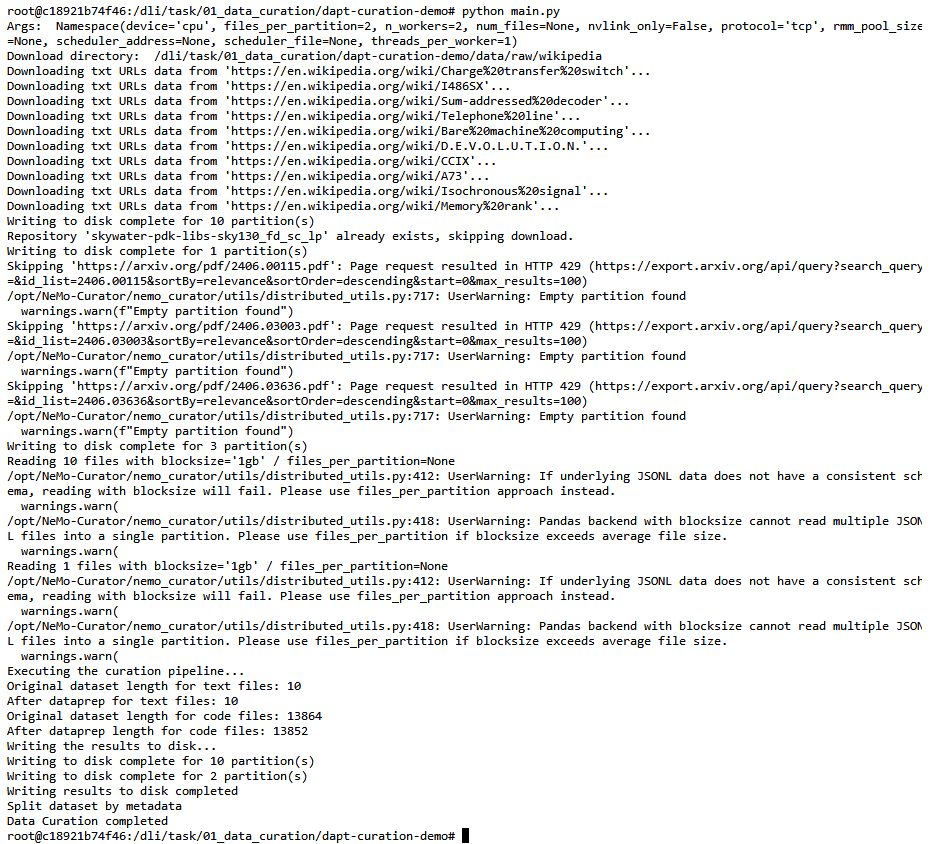
Expected terminal output:
Original dataset length for text files: 10
After dataprep for text files: 10
Original dataset length for code files: 13864
After dataprep length for code files: 13852
Writing the results to disk...
Data Curation completed
1.2 Workflow
Raw data sources: Wikipedia (text), GitHub repositories (code), arXiv PDFs.
wikipedia_dir = download_wikipedia_sources(
    "sources/wikipedia_urls.jsonl", limit=wikipedia_limit
)
github_dir = download_github_sources(
    "sources/github_repos.jsonl", limit=github_limit
)
pdf_dir = download_pdf_sources("sources/arxiv_urls.jsonl", limit=pdf_limit)
We save content to .jsonl files (JSON Lines). Each line is a complete JSON object, which makes it easy to read in parallel with Dask — each worker reads its own chunk of lines independently.
Curation Pipeline
The raw data is processed through the curation pipeline:
- Clean and unify formatting (e.g., Unicode normalization)
- Line-count filtering to remove too-short documents
- Exact deduplication to remove identical documents
- PII redaction on code files using spaCy and Presidio recognizers
Separate pipelines are defined for text and code:
curation_steps_text = Sequential([
    clean_and_unify,
    ScoreFilter(TextLineCountFilter(), text_field="file_type_count", score_type=bool),
    filter_text,
])

curation_steps_code = Sequential([
    clean_and_unify,
    ScoreFilter(CodeLineCountFilter(), text_field="file_type_count", score_type=bool),
    filter_code,
])
Then data is split by category so it can be blended at different weights:
separated_data_text = separate_by_metadata(
    final_dataset_text.df, out_path, "category"
).compute()
separated_data_code = separate_by_metadata(
    final_dataset_code.df, out_path, "category"
).compute()
The pipeline uses three deduplication techniques: exact (removes identical documents), fuzzy (near-duplicates via MinHash), and semantic (embedding-based similarity).
Blending and Shuffling
def blend_and_shuffle(args, dataset_paths, dataset_weights, target_size):
    datasets = [DocumentDataset.read_json(path) for path in dataset_paths]
    blended_dataset = nc.blend_datasets(target_size, datasets, dataset_weights)
    blended_dataset = nc.Shuffle(seed=42)(blended_dataset)
    blended_dataset.to_json(output_path)
Blending weights for chip-design-focused pretraining:
dataset_paths = ["CPP", "VerilogVHDL", "text", "Python"]
dataset_weights = [1.0, 4.0, 4.0, 1.0]
target_size = 20
This oversamples Verilog/VHDL and text. Shuffling after blending is important:
Without shuffling, the dataset is grouped by source and can cause catastrophic forgetting. Interleaving source types in training batches stabilizes learning — each gradient update sees a mix, so no single domain dominates and overwrites another.
Results
All 10 text documents passed quality checks. For code, 13,864 went in and 13,852 came out — 12 dropped as duplicates or too short. Curated data is written to /data/curated/ and split by category.
2. Custom Tokenization
Goal
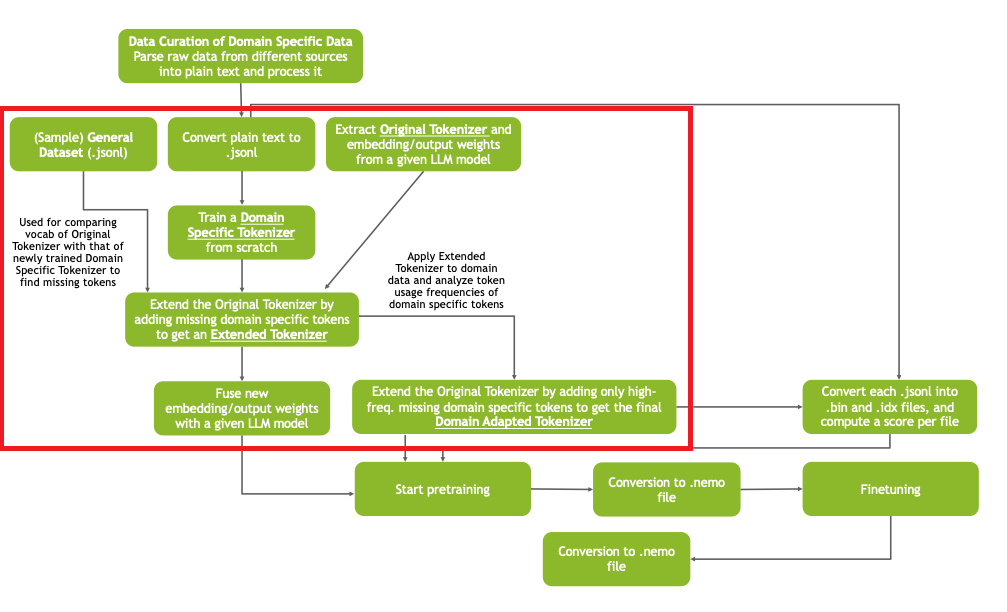
Given a tokenizer pretrained on general-purpose datasets, we want to adapt it to a specific domain (chip design in the workshop). Goals:
- Improve tokenization efficiency on domain-specific data
- Maintain efficiency on general-purpose datasets
- Minimize effort for retraining/fine-tuning
Since we don't have access to the full general-purpose pretraining data, we preserve the existing token mapping and strictly extend it with new domain tokens.
Tokens are the fundamental building blocks of data that LLMs read and generate. Custom tokenization adds specialized domain jargon to the tokenizer's master dictionary.
Approach
Train a Domain Specific Tokenizer from scratch on domain data, compare its vocabulary to the Original Tokenizer, and add the missing domain-specific tokens. This produces the final Domain Adapted Tokenizer.
Tradeoff
Adding too many domain tokens improves domain efficiency but slows DAPT convergence (disrupts general-purpose performance). Adding too few lacks coverage. To balance: identify the most frequently occurring missing tokens using a frequency threshold and only add those.
2.1 Train a tokenizer from scratch
data_root = "./curated_sample_data/curated_data/"
save_root = "./models/tokenizer/llama2/"
vocab_size = 20000  # ~67% of Llama 2's 32k vocab

tokenizer = AutoTokenizer.from_pretrained("facebook/opt-350m")
tokenizer = tokenizer.train_new_from_iterator(
    data_iterator(data_root, keys, batch_size),
    vocab_size=vocab_size
)
tokenizer.save_pretrained(save_root)
Key hyperparameters:
- Batch size: depends on available memory and dataset size
- Vocab size: 30–70% of original vocab size; technical domains need larger vocabularies
2.2 Identify new domain tokens
Compare the new tokenizer's vocabulary to the original and extend:
extend_tokenizer(vocab_size, split, model_type)
2.3 Token Usage Frequency Analysis
Apply the extended tokenizer to domain data, analyze usage frequencies, and select top-K tokens above a threshold:
freq_threshold = 0.98  # keep tokens accounting for top 98% of usage

analyze_token_usage(data_root, extended_tokenizer_path, batch_size, keys, token_usage_path)
get_high_freq_tokens(token_usage_path, high_freq_tokens_path, freq_threshold)
freq_threshold balances the tradeoff: lower (0.95–0.97) for highly specialized domains, higher (0.98–0.99) for domains closer to general-purpose data.
2.4 Initialize embeddings of new tokens
New token embeddings are initialized as the average of their sub-token embeddings:
extend_tokenizer_high_freq_tokens(
    data_root, ori_tokenizer_path, new_tokens,
    new_vocab_path, domain_adapter_tokenizer_path,
    old_ebd_path, new_ebd_path, split
)
2.5 Merge with the original embedding table
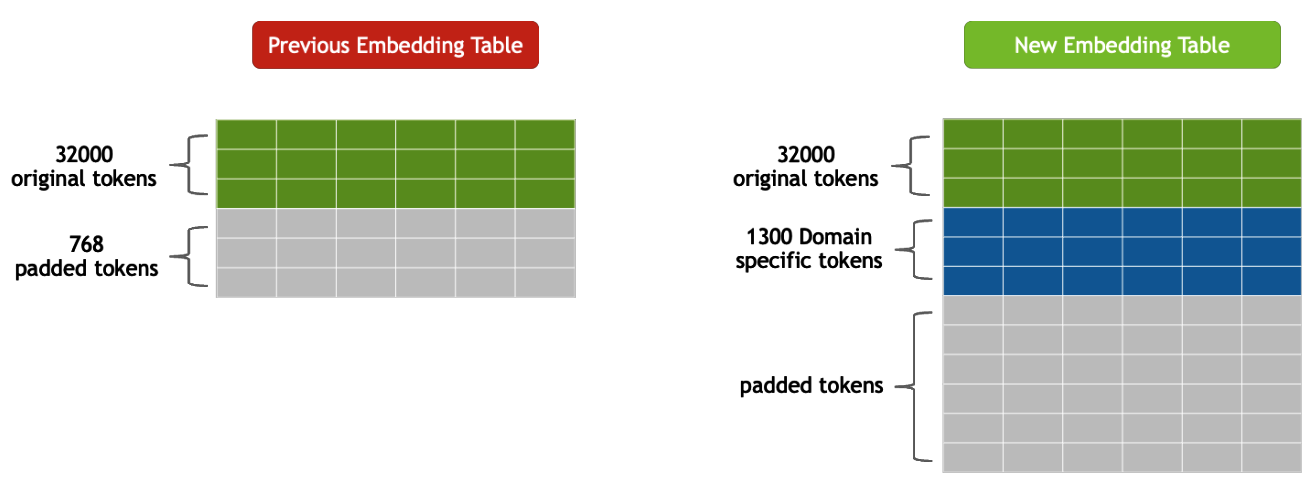
Before: 3,200 original tokens + 768 padded tokens. After: +1,300 domain-specific tokens added while retaining the original 3,200. Column count (embedding dimensionality) stays the same.
merge_embed(old_ebd_path, new_ebd_path, save_path)
3. Domain-Adaptive Pretraining (DAPT)
Goal
Take a foundational model (llama-2-7B) pretrained on a broad corpus and further pretrain it on a specific domain (chip design). Goals:
- Improve performance and accuracy on domain-specific tasks
- Ensure the model retains general language capabilities
- Minimize pretraining time by leveraging existing knowledge
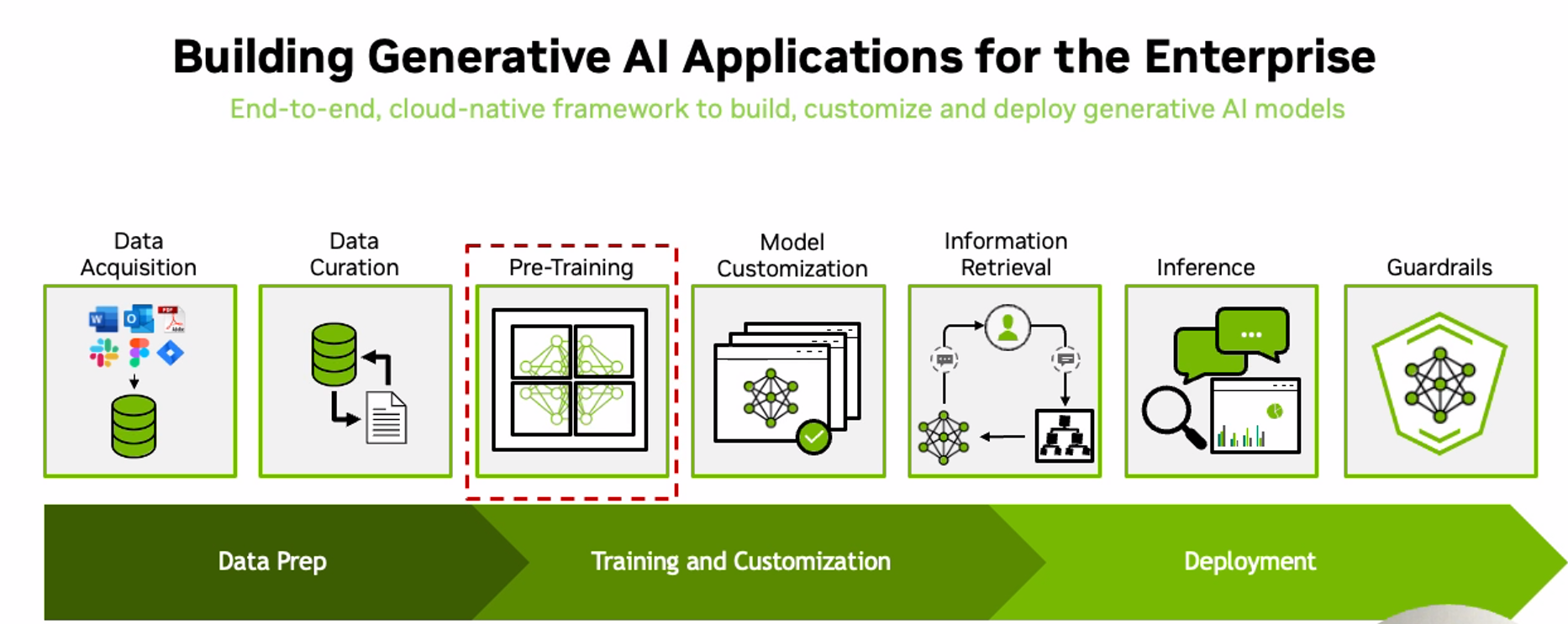
The main objective of DAPT is to further pre-train a general-purpose model on domain-specific data to improve its understanding of that domain's language and context.
A few important ideas:
- Tensor parallelism — shards weight matrices across GPUs, allowing very large models to fit in GPU memory
- Pipeline parallelism — splits the model by layers across GPUs (e.g., GPU 0 runs layers 1–8, GPU 1 runs layers 9–16)
- Data parallelism — shards input data into batches, each trained on the full model
- Selective activation recomputation — saves only essential activations and recomputes the rest
- Distributed checkpointing — saves/restores state even if the parallelism strategy changes between runs
Weights are the learnable parameters of a neural network. Training is the process of finding weights that minimize the loss function — gradient descent computes how much each weight contributed to the error, then nudges it in the direction that reduces that error. In practice, weights are stored as matrices (2D tensors), hence weight matrix.
def configure_recipe(nodes=1, gpus_per_node=1):
    recipe = llm.llama2_7b.pretrain_recipe(
        name="llama2_7b_dapt",
        num_nodes=nodes,
        num_gpus_per_node=gpus_per_node,
    )
    strategy = recipe.trainer.strategy
    strategy.context_parallel_size = 1
    strategy.tensor_model_parallel_size = 1
    recipe.trainer.val_check_interval = 10
    return recipe
Training configuration:
recipe.trainer.strategy.tensor_model_parallel_size = 2
recipe.trainer.max_steps = 20
recipe.trainer.max_epochs = 1
recipe.optim.config.lr = 1e-5
recipe.optim.lr_scheduler.min_lr = 1e-6
3.1 Evaluation
Quantitative: perplexity, ROUGE, BLEU, cosine similarity, LLM-as-a-judge scoring, adversarial failure rates.
Qualitative: human eval on relevance/coherence/factuality, LLM-as-a-judge for subjective scoring.
Use general-purpose benchmarks to confirm the model retains prior knowledge, task-specific benchmarks for the new domain, and adversarial benchmarks to test robustness.
4. Supervised Fine-Tuning (SFT)
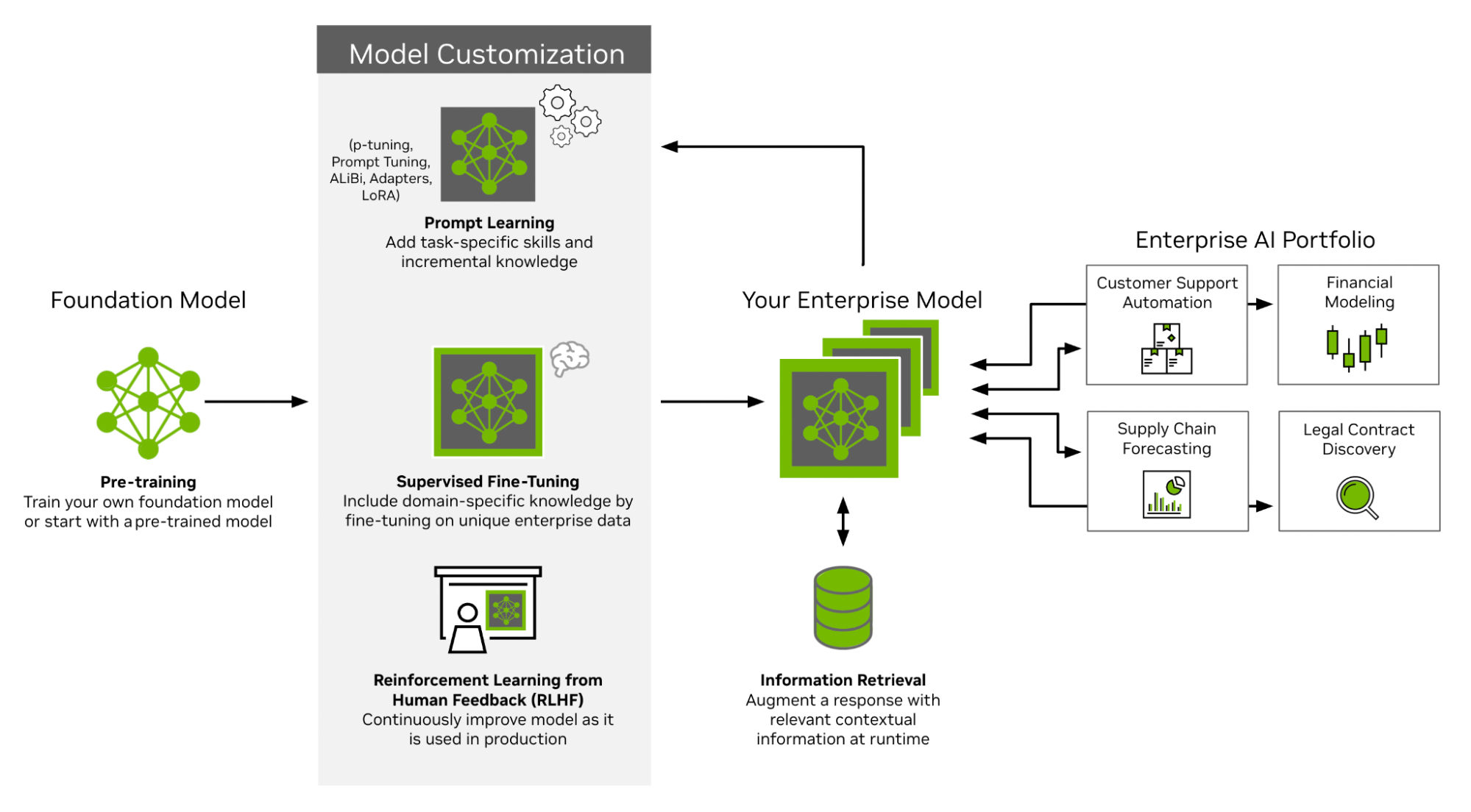
Supervised fine-tuning (SFT) enables a pretrained model to specialize in a given domain by training it on labeled data (input-output pairs), refining its responses while preserving broad pretrained knowledge. Also called "instruction tuning."
def configure_finetuning_recipe():
    return run.Partial(
        llm.finetune,
        model=llama2_7b(),
        trainer=trainer(),
        data=verilog(),
        log=logger(),
        optim=adam_with_cosine_annealing(),
        resume=resume(),
    )

run.run(configure_finetuning_recipe(), executor=local_executor_torchrun())
Key points when fine-tuning:
- Start from a DAPT or instruction fine-tuned model
- Use the domain-adapted tokenizer
- Use a smaller learning rate than DAPT (higher risk of catastrophic forgetting on small, high-quality SFT data)
- Prevent overfitting via early stopping with cross-validation
For evaluation: RLHF (accurate but slow, subjectively biased) vs. LLM-as-a-judge (fast but biased by training data, sensitive to prompts).
SFT yields better performance when built on top of a DAPT model rather than starting from a generic base model.
Conclusion
In order:
- Data curation — maximize LLM accuracy for specific tasks via deduplication, PII redaction, and quality filtering.
- Custom tokenization — train a domain tokenizer from scratch, identify high-frequency missing tokens, and add them to the original tokenizer.
- DAPT — further pretrain a foundational model (llama-2-7B) on the curated domain corpus.
- SFT — refine the DAPT model using labeled enterprise data.
The ChipNeMo paper that inspired this workshop showed measurable improvements on chip design tasks over the base Llama 2 model. This workshop is a hands-on reproduction of that methodology at smaller scale. If you're working on a domain-specific LLM problem — whether in cybersecurity, medicine, law, or hardware design — the pipeline here is a solid starting point.
Thanks for reading! Feel free to reach out if you'd like to talk about anything.